Search This Blog

Monday, July 10, 2023

A Barebone Script To Generate SQL Script to Create Synonyms

A Barebone Script To Generate SQL Script to Create Synonyms

This stored procedure can be used to generate a SQL script to create synonyms for all tables in a source database. Optionally, on the local SQL instance this SP can also create the synonyms for you, provided the target database and the schema (defaults to dbo and therefore can be omitted) already exists there. 

-- exec spGenerateSynonyms @sourcedb = 'AdminDBA', @targetdb = 'AdminDBA', @sourceschema= 'dbo', @targetschema='newschema', @printOnly = 1
/*
Description: 
Generates script to create synonyms in target db (usually, a blank db) for 
all tables that exist in source db (usually a subscriber db)

Requirements:
Source database and source schema (defaults to dbo so it can be omitted) 
must exist If parameter @PrintOnly is set to 0, meaning the script would  
also run the create synonyms statements then the  target database and 
schema must exist too... 

Caveats:
For now this procedure only generates scripts for tables. 
Synonyms on other types of objects (views, stored procedures etc.) are 
also supported by sql server.


Examples:
exec spGenerateSynonyms @sourcedb = 'EnterpriseSub', @targetdb = 'Enterprise', @printOnly = 1
exec spGenerateSynonyms @sourcedb = 'AdminDBA', @targetdb = 'Enterprise', @sourceschema='dbo',  @targetschema='myapp',  @printOnly = 1

exec spGenerateSynonyms @sourcedb = 'AdminDBA', @targetdb = 'Enterprise', @sourceSchema = 'appuser1', @printOnly = 1
exec spGenerateSynonyms @sourcedb = 'AdminDBA', @targetdb = 'AdminDBA', @targetschema='newschema', @printOnly = 0

exec spGenerateSynonyms @targetdb = 'ProductUserMaster' -- INVALID
exec spGenerateSynonyms @sourcedb = 'AdminDBA', @targetdb = 'AdminDBA'  -- INVALID, SOURCE AND TARGET  DATABASES + SCHEMAS CANNOT BE SAME

*/


set nocount on
go
use AdminDBA   -- Change this to the whatever database you are using to store DBA objects
go
if object_id('spGenerateSynonyms') is null
BEGIN
   PRINT 'Creating stored procedure spGenerateSynonyms'
   exec('create PROCEDURE spGenerateSynonyms as select '''' empty_string')
END
ELSE
   PRINT 'Stored procedure spGenerateSynonyms already exists.'
   PRINT 'Modifying stored procedure spGenerateSynonyms....'
GO
alter  PROCEDURE spGenerateSynonyms 
(
   @sourceDB sysname,                 -- aka base database where the objecgs are located
   @targetDB sysname,                 -- database where the synonyms will be created

   @object_type varchar(100) = 'Tables',   -- type of objects to create synonyms

   @sourceSchema sysname = 'dbo',     -- base schema name... defaults to dbo
   @targetSchema sysname = 'dbo',     -- defaults to dbo

   @PrintOnly bit = 1                 -- whether to also create the synonums or only print the SQL statements to create them
)


as
set nocount on

declare @sql varchar(4000), @def nvarchar(max)
declare @sql_string nvarchar(4000)

declare @sourceschema_id table(schema_id int)
declare @targetschema_id table(schema_id int)


select @sourcedb SourceDB, @sourceSchema SourceSchema, @targetdb TargetDB, @targetSchema TargetSchema

-- ************* VALIDATE INPUTS *********************
if @targetdb is null or @sourcedb is null
begin
   raiserror('Error: Source and target database names are required and cannot be null. Exiting...', 16, 1)
   return -1
end

if @targetdb  = @sourcedb and @sourceSchema = @targetSchema
begin
   raiserror('Error: Source and taget databases + schemas cannot be the same. Exiting...', 16, 1)
   return -1
end

if  db_id(@sourcedb) is null or  databasepropertyex(@sourcedb, 'Status')!='ONLINE'
begin
   raiserror('Error: Source database %s not found or not ONLINE. Exiting...', 16, 1, @sourcedb)
   return -1
end

-- If @PrintOnly=0 the SP will try to create the sysnonyms
-- Therefore the target db and the target schema must already exist
if @PrintOnly = 0 
BEGIN

		if  (db_id(@targetDB ) is null or  databasepropertyex(@targetDB , 'Status')!='ONLINE')
		begin
		   raiserror('Error: The target database %s not found or not ONLINE. Exiting...', 16, 1, @targetDB )
		   return -1
		end

		set @sql = 'select schema_id from [' + @targetDB + '].sys.schemas where name = ''' + @targetschema + ''''
		insert into @targetschema_id  exec (@sql)
		if not exists (select * from @targetschema_id)
		BEGIN
		   raiserror('Error: Target schema %s not found in the %s database . Exiting...', 16, 1, @targetSchema, @targetdb)
		   return -1
		END


END


set @sql = 'select schema_id from [' + @sourceDB + '].sys.schemas where name = ''' + @sourceSchema + ''''
insert into @sourceschema_id exec (@sql)
if not exists (select * from @sourceschema_id)
BEGIN
	raiserror('Error: Source schema %s not found in the %s database . Exiting...', 16, 1, @sourceschema, @sourceDB)
	return -1
END


if object_id('tempdb..#t1_synonyms_definitions') is not null
   drop table #t1_synonyms_definitions
create table #t1_synonyms_definitions(definition nvarchar(max))
set @sql = 'select  ''
Use [' + @Targetdb + ']
IF NOT EXISTS (SELECT * FROM sys.synonyms WHERE schema_id = schema_id(''''' + @targetSchema + ''''') and name = N'''''' + NAME + '''''') 
CREATE SYNONYM [' + @targetSchema + '].['' + name + ''] FOR [' + @sourcedb + '].[' + @sourceSchema + '].['' + name  + '']'' from [' + @sourcedb + '].sys.tables'

if @sourceSchema is not null
set @sql = @sql + ' where schema_name(schema_id) = ''' + @sourceSchema + ''''

insert into #t1_synonyms_definitions exec (@sql)
select * from #t1_synonyms_definitions
declare c1 cursor for select * from #t1_synonyms_definitions
open c1
fetch c1 into @def 
while @@fetch_status = 0
begin
      print @def


      if @printOnly = 0 exec (@def)
      fetch c1 into @def 

end
close c1
deallocate c1

But why synonyms? Synonyms can mask/hide the underlying location of the base objects (think of linked server queries, cross database queries etc.),  regardless of who owns them and/or their names.  Or maybe you have two identical copies of the same app/code, one pointing to the live data and the other for the archive/historical data.

You might be wondering, well views can achieve the same and I can add some logic to make them even useful. And you would be right, views are more useful and certainly has more use cases. But if you are creating views only to mask the underlying location of tables or their names, then I would say synonyms are better because for one thing, the views would not automatically reflect changes to the underlying tables structures. Of course then there are good use cases where you don't want a view to exactly reflect the underlying table structure.


Query the fully qualified connection string for the AlwaysOn Connection

fully qualified connection string for the AlwaysOn Connection

While we maintain a detailed inventory of all our SQL Servers and configurations, the list is quite extensive. I often find myself needing to quickly look up the Always On Availability Group (AG) connection string for a specific database, especially in environments with multiple AGs configured.

I’ll skip the background story of why things are set up this way, but here’s a handy SQL script I use to retrieve the connection string for either a specific AG database or all AGs on the current SQL Server instance:

/********************************************************************************************
    Script: Get Fully Qualified SQL Connection String for Always On Databases
    Author: [Your Name or Handle]
    Reference: https://sqlpal.blogspot.com/2023/07/query-fully-qualified-connection-string.html
    Purpose:
        Returns a list of SQL Server connection strings for databases 
        participating in an Always On Availability Group (AG).

    Parameters:
        @dbname NVARCHAR(500)
            - If NULL or empty string, returns connection strings for *all* AG databases.
            - If a specific database name is provided, validates that it exists 
              and belongs to an AG.

    Output Columns:
        ConnString   : Fully qualified DNS\Instance connection string.
        AGName       : Availability Group name.
        DNSName      : Listener DNS name.
        SQLInstance  : Current SQL instance name.
        ClusterNodes : List of participating cluster node names.
        TCPPort      : Listener port number.

    Notes:
        - Requires VIEW SERVER STATE permission (to access DMVs).
        - xp_regread requires sysadmin privileges (reads registry).
********************************************************************************************/

DECLARE @dbname NVARCHAR(500)
SET @dbname = N''   -- Set to a specific database name if desired.

-- STEP 1: Retrieve current server's domain name suffix from registry.
-- This is used to append FQDN to the listener name.
DECLARE @DomainName NVARCHAR(100)
EXEC master.dbo.xp_regread 
     'HKEY_LOCAL_MACHINE',
     'SYSTEM\\CurrentControlSet\\Services\\Tcpip\\Parameters',
     N'Domain',
     @DomainName OUTPUT

-- STEP 2: Input validation.
-- Ensure that the provided database exists locally.
IF DB_ID(@dbname) IS NULL AND @dbname <> ''
    RAISERROR('No database found with name %s.', 16, 1, @dbname)

-- If the database exists but is not part of any Availability Group, raise an error.
ELSE IF DB_ID(@dbname) IS NOT NULL AND @dbname <> '' 
     AND NOT EXISTS (SELECT * FROM sys.availability_databases_cluster WHERE database_name = @dbname)
    RAISERROR('Database is not part of an Availability Group: %s.', 16, 1, @dbname)

-- STEP 3: Check if Always On is enabled before proceeding.
ELSE IF SERVERPROPERTY('IsHadrEnabled') = 1
BEGIN
    -- Build a comma-separated list of all cluster node names for reference.
    DECLARE @ClusterNodes VARCHAR(8000)
    SELECT @ClusterNodes = COALESCE(@ClusterNodes + ', ', '') + node_name
    FROM (SELECT DISTINCT node_name 
          FROM sys.dm_hadr_availability_replica_cluster_nodes) AS a

    -- STEP 4: Generate and return connection info for each AG listener.
    SELECT 
        -- Construct the FQDN + Instance connection string.
        UPPER(
            CASE 
                WHEN SERVERPROPERTY('InstanceName') IS NULL 
                    THEN DNS_NAME 
                ELSE CONCAT(
                        DNS_NAME, 
                        ISNULL(CONCAT('.', @DomainName), ''), 
                        '\', 
                        CAST(SERVERPROPERTY('InstanceName') AS NVARCHAR(100))
                     )
            END
        ) AS ConnString,
        UPPER(ag.name) AS AGName,
        UPPER(dns_name) AS DNSName,
        UPPER(CAST(SERVERPROPERTY('InstanceName') AS NVARCHAR(100))) AS SQLInstance,
        UPPER(@ClusterNodes) AS ClusterNodes,
        port AS TCPPort
    FROM sys.availability_groups AS ag
    INNER JOIN sys.availability_group_listeners AS agl 
        ON ag.group_id = agl.group_id
    WHERE CAST(agl.group_id AS VARCHAR(100)) LIKE 
          CASE 
              WHEN @dbname IS NULL OR @dbname = '' THEN '%'
              ELSE (
                    SELECT CAST(group_id AS VARCHAR(100)) 
                    FROM sys.availability_databases_cluster 
                    WHERE database_name = @dbname
                   )
          END
END

-- STEP 5: Handle case when Always On is not enabled.
ELSE IF SERVERPROPERTY('IsHadrEnabled') = 0
    RAISERROR('SQL Server is not an AlwaysOn Cluster.', 16, 1)
ELSE
    RAISERROR('Unknown error occurred.', 16, 1)


The earliest SQL Server version I’ve tested this script on is SQL Server 2016 SP2.

I hope you find it useful! If you happen to spot a bug or logical issue, let me know, I’ll do my best to fix it as soon as possible.

And for those who prefer scripting with PowerShell, here’s a version written in that too:

<#
.SYNOPSIS
    Retrieves Always On Availability Group (AG) connection strings for one or all AG databases.

.DESCRIPTION
    This script queries the specified SQL Server instance using SMO to
    return the fully qualified connection string for each AG listener.
    If a database name is provided, it validates that the database exists
    and belongs to an AG, then returns AG details for that specific database.

.PARAMETER sql_server
    The target SQL Server instance in the form 'ServerName\InstanceName'.

.PARAMETER db_name
    (Optional) Name of the database to check. If omitted or blank, the script
    returns information for all AGs on the instance.

.EXAMPLE
    $sql_server = 'SQLServer\SQLInstance'
    # Returns FQDN connection strings for all AGs.

.EXAMPLE
    $sql_server = 'SQLServer\SQLInstance'
    $db_name = "AppDB"
    # Returns the connection string for the AG hosting AppDB.

.NOTES
    Tested on SQL Server 2016 SP2 and up.
    Requires SqlServer PowerShell module (Install-Module SqlServer).
#>

# =====================================================
# CONFIGURATION - Modify these variables as needed
# =====================================================
$sql_server = 'SQLServer\SQLInstance'  # Target SQL Server instance
#$db_name = "AppDB"                    # Uncomment and set for specific DB

# =====================================================
# MAIN SCRIPT LOGIC
# =====================================================

# STEP 1: Connect to the SQL instance using SMO
$sql_conn = Get-SqlInstance -ServerInstance $sql_server
$sql_instance_name = $sql_conn.InstanceName

Write-Host "Connected to: $sql_server" -ForegroundColor Green
Write-Host "Instance Name: $sql_instance_name" -ForegroundColor Cyan

# STEP 2: Verify that Always On is enabled on this instance
if (-not $sql_conn.IsHadrEnabled) {
    Throw "Always On Availability Groups are not enabled on instance '$sql_server'."
}
else {
    $ag = $sql_conn.AvailabilityGroups
    Write-Host "Always On is enabled. Found $($ag.Count) Availability Group(s)." -ForegroundColor Green
}

# STEP 3: If a database name was provided, validate it and gather AG info
if ($db_name -and $db_name -ne '') {
    Write-Host "Validating database: $db_name" -ForegroundColor Yellow
    
    $sql_db = Get-SqlDatabase -Name $db_name -InputObject $sql_conn
    $db_ag_name = $sql_db.AvailabilityGroupName

    if (-not $db_ag_name) {
        Throw "Database '$db_name' is NOT part of an Availability Group."
    }
    else {
        Write-Host "Database '$db_name' is part of AG: $db_ag_name" -ForegroundColor Green

        # Filter the AG list to the specific one containing the database
        $ag = $sql_conn.AvailabilityGroups | Where-Object { $_.Name -eq $db_ag_name }

        # Check and display if the local server is currently the primary replica
        $is_primary_replica = $sql_db.IsLocalPrimaryReplica()
        Write-Host "Is local server the primary replica? $is_primary_replica" -ForegroundColor Cyan

        # Display the name of the AG's primary replica
        $primary_replica = $ag.PrimaryReplicaServerName
        Write-Host "Primary replica for AG '$db_ag_name' is: $primary_replica" -ForegroundColor Cyan
    }
}

# STEP 4: Retrieve all AG listener information
$ag_listeners = $ag.AvailabilityGroupListeners
Write-Host "Found $($ag_listeners.Count) listener(s)" -ForegroundColor Yellow

# STEP 5: FIXED - Create new calculated properties for convenience
$ag_listeners | Add-Member -MemberType ScriptProperty -Name fqdn_ag_conn_string -Value {
    # Get FQDN of listener, trim any trailing backslashes, add single instance separator
    $listenerFQDN = [System.Net.Dns]::GetHostEntry($this.Name).HostName.TrimEnd('\')
    $listenerFQDN + '\' + $sql_instance_name
}

$ag_listeners | Add-Member -MemberType AliasProperty -Name ag_name -Value Parent

# STEP 6: Output final results in a clean table format
Write-Host "`n=== AVAILABILITY GROUP CONNECTION STRINGS ===" -ForegroundColor Magenta
$ag_listeners | Select-Object ag_name, fqdn_ag_conn_string, Port | 
    Format-Table -AutoSize -Wrap

Write-Host "`nScript completed successfully!" -ForegroundColor Green


Thursday, July 6, 2023

Reading and searching events inside the SQL Server default trace

Reading and searching events inside the SQL Server default trace

Note: SQL Trace and SQL Server Profiler are deprecated and will be removed in a future version of Microsoft SQL Server. The replacement technology for them is Extended Events. 

To Learn More: 

https://learn.microsoft.com/en-us/sql/relational-databases/sql-trace/sql-trace?view=sql-server-ver16


SQL Server comes with a default trace configured and enabled/ON by default. There are couple ways (maybe more) you can find out whether the default trace is ON/OFF.


As of SQL Server version 2019, you cannot modify or drop the default trace but you can turn it off/on using the SP_CONFIGURE command. For example to start the default trace:


To view what events are captured in the default trace:

select 
       c.name EventCategory,
       e.name EventName
from 
(SELECT distinct eventid FROM fn_trace_geteventinfo(1)) t  
inner join sys.trace_events e on e.trace_event_id = t.eventid
inner join sys.trace_categories c ON e.category_id = c.category_id
order by EventCategory, EventName


That being said, I would like to read/search events from all trace logs for this default trace, including those that were rolled over. In order to do that I will need to remove the rollover number from the name of the current trace file. For example file name log_262.trc would need to be trimmed to log.trc. Then pass that to the fn_trace_gettable along with value Default for the second parameter number_files (number of trace files to read).   For example: sys.fn_trace_gettable(@trace_file_name, DEFAULT). The value of Default would make sure SQL Server reads all rollover files until it reaches the end of the trace. 

Here is the complete SQL script, results are filtered to look for data and log file auto growth events but you can comment those lines out:

-- lets view the settings for the default trace
SELECT * FROM sys.traces WHERE is_default = 1

-- lets get the trace file name without the roll over number
Declare @trace_file_full_name nvarchar(1000);
Declare @trace_file_path nvarchar(1000);
Declare @trace_file_name nvarchar(1000);

SELECT @trace_file_full_name = path FROM sys.traces WHERE is_default = 1

-- Split the file name into path and just the file name parts
select  
       @trace_file_path = LEFT(@trace_file_full_name,LEN(@trace_file_full_name) - charindex('\',reverse(@trace_file_full_name),1) + 1),  
       @trace_file_name = RIGHT(@trace_file_full_name, CHARINDEX('\', REVERSE(@trace_file_full_name)) -1) ;

-- remove the roll over number from the trace file name
;with cte as
(
       SELECT PATINDEX('%[0-9.]%', @trace_file_name) start_at, CHARINDEX('.', @trace_file_name) end_at
)
select @trace_file_name = replace(STUFF(@trace_file_name, start_at, end_at-start_at, ''), '_', '')  from cte;

-- put the path and file name back together
select @trace_file_name = (@trace_file_path +  @trace_file_name)

select @trace_file_name trace_file_name

-- now we can look for any information available in the trace files, current as well as rolled over ones
if @trace_file_name is null
begin
    goto ErrorSection
end
        
select top 10000
       t.DatabaseName,
e.name EventName,
       t.Duration Duration_Micro_Seconds,
       t.Duration / 1000000 Duration_Seconds,
       t.* 
from sys.fn_trace_gettable(@trace_file_name, DEFAULT) t
inner join sys.trace_events e on e.trace_event_id = t.EventClass
inner join sys.trace_categories c ON e.category_id = c.category_id
where 1=1
and e.name  in ('Log File Auto Grow', 'Data File Auto Grow')
and t.DatabaseName !='tempdb'
order by t.starttime desc
goto Success

ErrorSection:
raiserror('Default trace file name could not be determined...', 16,1)

Success:


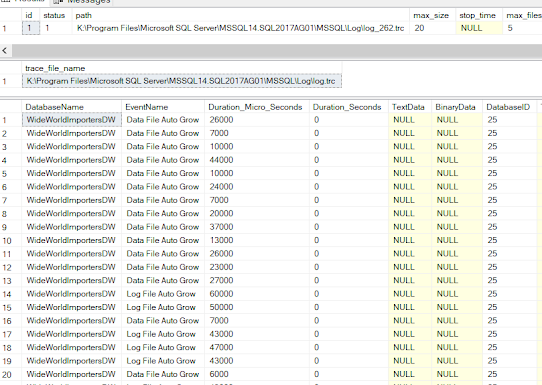
Results:


Though much belated and won't be of much use when the Trace/Profile features are completely removed in future SQL Server versions, I hope you still find the post useful.


Wednesday, July 5, 2023

Wait a minute, CLUSTERED COLUMNSTORE indexes are not ordered?

Wait a minute, CLUSTERED COLUMNSTORE indexes are not ordered?

Just to reiterate what's in the title of this post, what I mean is that the CLUSTERED COLUMNSTORE indexes are not ordered, while NONCLUSTERED COLUMNSTORE created indexes are on regular, ROWSTORE tables are. This should be evident from the fact that the  SQL Server does not even allow you to specify column list when creating a clustered columnstore index. (Correction: An option to create/rebuild an ordered CCI is available in SQL Server 2022).

If order of the data is important (and it is for query performance if that's the problem you want to fix or prevent from happening in future), its up to the data architect to figure out how to order the data and make sure that order is enforced by any processes that writes to the table.  Especially if that table is mostly (like close to 100% of the time) suppose to have data additions in right/intended order and NO DELETES or UPDATES or with much less frequency.

For existing clustered columnstore index, one strategy that I have employed to fix poorly ordered data to my needs, (without having to build or recreate tables and structures) :

  1. Drop the existing columnstore index.
  2. Create a clustered rowstore index with key columns that match the data order for the table.
  3. Create a new clustered columnstore index with the DROP_EXISTING=ON option.


For example Code:

-- Step 1
DROP INDEX CCI_my_table ON my_table;
-- Step 2
CREATE CLUSTERED INDEX CCI_my_table ON my_table ([TimeStamp]);
-- Step 3
CREATE CLUSTERED COLUMNSTORE INDEX CCI_my_table ON my_table WITH (DROP_EXISTING=ON, MAXDOP=1);

So what is the catch? Why shouldn't I make this part of my regular database maintenance task if I know I have or will have poorly ordered data in my clustered columnstore indexes?  Well, dropping a clustered columnstore index is not a quick operation. It requires converting the columnstore structure into a b-tree/heap structure, this requires more computing resources than dropping a clustered rowstore index.

If data in your clustered columnstore indexes are becoming unordered quickly, then I think you need a different solution. This method of fixing the data order on a columnstore index should be mainly reserved for less frequent cases/scenarios where fragmentation is too high, enough to negatively impact analytic processes.

Although much more complex, if the table is also partitioned, which is a technique often combined with columnstore indexes, you can use this method for specific partitions.


Monday, June 19, 2023

List Top Tables in SQL Server Database by Size

List Top Tables in SQL Server Database by Size

There are countless queries you can find on internet to get list of tables, size of database, tables, indexes etc...  Here is a one that I have used for my needs in my current employment.  I am  not only interested in size of tables but also size of indexes in each table. 

Note: This query relies on metadata/catalog views to get the table size, row count etc.. as SQL Server does a pretty good job  of keeping them up to date. However in rare cases if in doubt about the accuracy of the results, you can run the following command in the database to manually correct any inaccuracies. On relatively large database this can take a while to complete so keep that in mind. Generally though you do not need to run DBCC UDPATEUSAGE on regular basis.  

DBCC UPDATEUSAGE (0) WITH NO_INFOMSGS


-- QUERY TO GET TOP 100 TABLES BY SIZE - LARGEST TO SMALLEST...

-- DBCC UPDATEUSAGE (0) WITH NO_INFOMSGS;
SELECT top 100

    s.Name AS schema_name,
    tbl.NAME AS table_name,
    SUM(SUM(au.total_pages) * 16 /1024) over(partition by ind.object_id) total_table_size_mb, 
    SUM(SUM(au.used_pages) *  16 /1024) over(partition by ind.object_id) total_used_space_mb, 

    ind.name index_name,
    ind.type_desc index_type,
    INDEXPROPERTY(ind.object_id, ind.name, 'IsUnique') is_unique,
    (select count(*) from sys.index_columns ic where ic.object_id = ind.object_id and ic.index_id = ind.index_id and ic.is_included_column = 0) indexed_columns,
    (select count(*) from sys.index_columns ic where ic.object_id = ind.object_id and ic.index_id = ind.index_id and ic.is_included_column = 1) included_columns,

    SUM(p.rows) AS ind_row_count,
    SUM(au.total_pages) * 16 /1024 AS ind_size_mb, 
    SUM(au.used_pages) *  16 /1024 AS ind_used_size_mb, 
    SUM(au.used_pages) *  16 / SUM(p.rows) ind_avg_row_size_kb,
    (SUM(au.total_pages) - SUM(au.used_pages)) * 16 /1024 AS vunused_space_mb,
    INDEXPROPERTY(ind.object_id, ind.name, 'IndexDepth') index_depth,
    ind.index_id

FROM 
    sys.tables tbl
    INNER JOIN sys.indexes ind ON tbl.OBJECT_ID = ind.OBJECT_ID
    INNER JOIN sys.partitions p ON ind.OBJECT_ID = p.OBJECT_ID AND ind.index_id = p.index_id
    INNER JOIN sys.allocation_units au ON p.PARTITION_ID = au.container_id
    INNER JOIN sys.schemas s ON tbl.SCHEMA_ID = s.SCHEMA_ID
-- WHERE tbl.NAME = '<Schema.Table_Name>'
GROUP BY  s.Name, ind.object_id, ind.index_id, tbl.Name, ind.name, ind.type_desc
HAVING SUM(p.rows) > 0
ORDER BY  total_used_space_mb desc